由于全局解释器锁(GIL)的存在,LangGraph 主要实现的其实是 并发,而不是真正的多核并行。考虑到 官方文档 大量使用 parallelization(并行)这个词,为与之保持一致,依然使用并行作为标题。但是除标题之外,该是并发的地方就表述为并发,以免读者混淆 ( ̄O ̄)ノ
本节介绍四种实现并发的方式:
节点并发
@task装饰器Map-reduce
Sub-graphs
节点并发 通过并联节点实现并发;@task 装饰器 将函数声明为并发执行单元;Map-reduce 用 Send 函数并发地发送参数给节点执行;Sub-graphs 通过并联子图实现并发。总有一种方法适合你。
import os
import time
import operator
import uuid

from dotenv import load_dotenv
from typing import Annotated
from datetime import datetime
from pydantic import BaseModel
from typing_extensions import TypedDict
from langchain_openai import ChatOpenAI
from langchain.messages import HumanMessage
from langgraph.graph import StateGraph, MessagesState, START, END
from langgraph.types import Send
from langgraph.func import entrypoint, task
from langgraph.checkpoint.memory import InMemorySaver
from IPython.display import Image, display
from concurrent.futures import ThreadPoolExecutor

# 加载模型配置
_ = load_dotenv()

# 加载模型
model_name = "qwen3-max"
llm = ChatOpenAI(
    api_key=os.getenv("DASHSCOPE_API_KEY"),
    base_url=os.getenv("DASHSCOPE_BASE_URL"),
    model=model_name,
    temperature=0.7,
)# 创建并发节点a
def node_a(state: MessagesState):
start_time = datetime.now()
print(f"[node_a] 进入函数时间: {start_time.strftime('%Y-%m-%d %H:%M:%S.%f')[:-3]}")
# 使用 sleep 模拟占用时间
time.sleep(2)
end_time = datetime.now()
print(f"[node_a] 退出函数时间: {end_time.strftime('%Y-%m-%d %H:%M:%S.%f')[:-3]}")
return {'messages': [HumanMessage(
content=f'节点a运行了{round((end_time - start_time).total_seconds(), 3)}秒'
)]}
# 创建并发节点b
def node_b(state: MessagesState):
start_time = datetime.now()
print(f"[node_b] 进入函数时间: {start_time.strftime('%Y-%m-%d %H:%M:%S.%f')[:-3]}")
# 使用 sleep 模拟占用时间
time.sleep(4)
end_time = datetime.now()
print(f"[node_b] 退出函数时间: {end_time.strftime('%Y-%m-%d %H:%M:%S.%f')[:-3]}")
return {'messages': [HumanMessage(
content=f'节点b运行了{round((end_time - start_time).total_seconds(), 3)}秒'
)]}
# 创建图
builder = StateGraph(MessagesState)
# 添加节点
builder.add_node('node_a', node_a)
builder.add_node('node_b', node_b)
# 添加边
builder.add_edge(START, 'node_a')
builder.add_edge(START, 'node_b')
builder.add_edge('node_a', END)
builder.add_edge('node_b', END)
# 编译图
my_graph = builder.compile(name='my-graph')
my_graph
# 调用图
response = my_graph.invoke({
    'messages': [HumanMessage(content='执行 node_a 和 node_b')]
})

for message in response['messages']:
    message.pretty_print()
[node_a] 进入函数时间: 2025-12-14 00:17:18.105[node_b] 进入函数时间: 2025-12-14 00:17:18.105
[node_a] 退出函数时间: 2025-12-14 00:17:20.111
[node_b] 退出函数时间: 2025-12-14 00:17:22.110
================================ Human Message =================================
执行 node_a 和 node_b
================================ Human Message =================================
节点a运行了2.005秒
================================ Human Message =================================
节点b运行了4.005秒
二、@task 装饰器
@task 装饰器将 generate_paragraph 函数声明为并发执行单元,调用该函数会返回 future 对象。由 @entrypoint 装饰器定义的工作流入口函数可并发调用多个 generate_paragraph 函数,并将返回的 future 对象收集起来。
# 可并发的执行单元
@task
def generate_paragraph(topic: str) -> str:
    response = llm.invoke([
        {"role": "system", "content": "你是一个会写科普文的智能助手"},
        {"role": "user", "content": (
            f"写一个关于{topic}的段落,大约100字。"
            "你写的内容只是整篇文章的一个段落"
            "因此请聚焦给定话题,不需要概述性文字")}
    ])
    return response.content

# 创建持久化检查点
checkpointer = InMemorySaver()

# 工作流入口函数,可并发地调用被 @task 装饰的函数
@entrypoint(checkpointer=checkpointer)
def workflow(topics: list[str]) -> str:
    # 将 topic 分发到多个任务节点,并发执行
    futures = [generate_paragraph(topic) for topic in topics]
    paragraphs = [f.result() for f in futures]
    return "\n\n".join(paragraphs)

# 运行工作流
config = {"configurable": {"thread_id": str(uuid.uuid4())}}
result = workflow.invoke(["海胆豆腐是什么", "海胆豆腐有多美味", "海胆豆腐的原料和做法"], config=config)
print(result)
海胆豆腐是一道融合了海鲜鲜甜与豆制品柔滑的精致料理,通常以嫩豆腐为基底,铺上新鲜海胆(即海胆的生殖腺),有时辅以蛋清蒸制而成。成品质地细腻如凝脂,海胆的浓郁甘香与豆腐的清淡相得益彰,入口即化,既保留了食材本味,又呈现出层次丰富的海洋风味。
海胆豆腐的妙处在于极致的鲜与嫩交融——温润如玉的嫩豆腐托着金黄海胆,入口先是海胆的甘甜在舌尖化开,带着海洋的清鲜与微妙的奶油感,紧接着豆腐的柔滑悄然接续,两者在热气中融为一体,既不夺彼此锋芒,又共谱出层次丰盈的鲜美。只需一勺,便足以让味蕾沉溺在这场山海交汇的温柔盛宴里。
海胆豆腐的主要原料包括新鲜海胆黄、嫩豆腐、姜末和高汤。做法是先将豆腐切块焯水去腥,再与高汤一同入锅小火慢炖;待汤微沸后轻轻放入海胆黄,避免搅动以防碎散,最后撒入姜末提鲜,煮约1分钟即可出锅,保持海胆的鲜甜与豆腐的滑嫩。
三、Map-reduce
学过 Hadoop 的人都知道,map-reduce 是一个「先并行,后归约」的过程。这个概念被借鉴到 Agent 这里,变成了「先发散,后收敛」。借鉴过来之后,它的内涵其实变简单了,简单到不用 LangGraph 也能实现。那为什么还要用 LangGraph 呢?当然是因为用 LangGraph 写的 map-reduce 更标准化,可读性也更强一些。
下面从一个非常实际的问题入手:女神不回消息怎么办!!!
我们来创建几种人设:
男神
巨魔
舔狗
渣男
奶狗弟弟
社恐宅男
霸道总裁
茶茶的男生 💅💅💅
文艺长发男
萌萌二次元
你一定非常好奇,这些人会如何应对。下面我们来揭秘。
1)创建上下文的 schema
# 角色
class Roles(BaseModel):
    roles: list[str]

# 单个角色
class Role(BaseModel):
    role: str

# 单个回复
class Response(BaseModel):
    response: str

# 最佳回复的 ID
class BestResponse(BaseModel):
    id: int

# 全局上下文
class Overall(TypedDict):
    roles: list[str]
    responses: Annotated[list, operator.add]
best_response: str2)创建提示词模版
# 角色的提示词
role_prompt = "女神又不回你消息了,作为一个{role},你应该如何一句话回复女神?请以JSON格式返回,包含response字段"

# 最佳回复的提示词
best_response_prompt = """下面是几种类型的男生,面对女神不回消息的情况,做出的反应。
你觉得以下哪种回复最能挽回女神的心,请返回对应的ID。
注意哦,第一条反应对应的是0号ID。并以JSON格式返回,包含id字段
下面是男生们的反应:\n\n{responses}"""# [MAP] 使用 Send 函数分发角色
def continue_to_responses(state: Overall):
return [ Send("generate_response", {"role": r}) for r in state["roles"] ]
# [MAP] 角色回复节点:生成每个角色的回复
def generate_response(state: Role):
prompt = role_prompt.format(role=state["role"])
response = llm.with_structured_output(Response).invoke(prompt)
return {"responses": [response.response]}
# [REDUCE] 最佳回复节点:返回最佳回复
def best_response(state: Overall):
responses = "\n\n".join(state["responses"])
prompt = best_response_prompt.format(responses=responses)
response = llm.with_structured_output(BestResponse).invoke(prompt)
return {"best_response": state["responses"][response.id]}4)编译图
# 定义Doge子图的输出Schema
class DogeOutput(TypedDict):
    roles: list[str]
    responses: list[str]
    best_response: str

# 创建图
doge_builder = StateGraph(Overall, output_schema=DogeOutput)

# 添加节点
doge_builder.add_node("generate_response", generate_response)
doge_builder.add_node("best_response", best_response)

# 添加边
doge_builder.add_conditional_edges(START, continue_to_responses, ["generate_response"])
doge_builder.add_edge("generate_response", "best_response")
doge_builder.add_edge("best_response", END)

# 编译图
doge_graph = doge_builder.compile(name='best-response')
doge_graph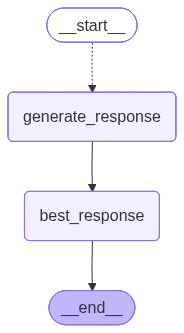
# 调用图
roles = ["男神", "巨魔", "舔狗", "渣男", "奶狗弟弟", "社恐宅男",
         "霸道总裁", "茶茶的男生 💅💅💅", "文艺长发男", "萌萌二次元"]
response = doge_graph.invoke({"roles": roles})
# 最佳回复
print(f"最受 {model_name} 喜爱的回复:{response['best_response']}")最受 qwen3-max 喜爱的回复:看来我的消息在你那儿成了未读的收藏,那我先去修炼成更值得你点开的样子。
# 所有回复
for role, resp in zip(response["roles"], response["responses"]):
print(f"【{role}】")
print(resp)
print()【男神】
看来我的消息在你那儿成了未读的收藏,那我先去修炼成更值得你点开的样子。
【巨魔】
看来我的消息又在女神的已读不回区排队了,要不要给我发个排队号?
【舔狗】
没事,你忙你的,我随时都在。
【渣男】
刚在忙,没看到消息,不过你一上线我就秒回了——毕竟对你,我从来都不是渣,只是慢半拍的认真。
【奶狗弟弟】
姐姐是不是在忙呀?不着急回我,但我会一直乖乖等你~
【社恐宅男】
刚刚在打游戏/看番,看到消息有点紧张,不知道怎么回才好……你还好吗?
【霸道总裁】
看来我的消息在你那儿成了VIP,排队都排不上。不过没关系,我亲自来取你的回复。
【茶茶的男生 💅💅💅】
宝~是在忙吗?茶茶等你回消息等到花都谢啦~💅✨
【文艺长发男】
风起时,长发拂过未读的对话框,我在诗行间等你回眸,哪怕只是一句‘在’。
【萌萌二次元】
呜...女神大人是不是在忙呀?(๑•̀ㅂ•́)و✧ 我会乖乖等你回消息的!
四、Sub-graphs
已经写好的图,可以放到父图里面作为 子图(Sub-graphs)调用。这意味着我们可以复用已经写好的图。
上一节创建的图 doge_graph 只产出了一条“最佳”回复,这真的够吗?罒ω罒
不够不够,必须再加一个工作流以策万全!
1)创建一个工作流
下面我们创建一个工作流。它不像 doge_graph 那样需要指定人设,而是可以自动生成 n 个新人设,再生成这些人设的回复。
# 定义ReAct子图的全局Schema
class ReActState(TypedDict):
roles: list[str]
n: int
new_roles: list[str]
responses: list[str]
# 发散性地生成角色
def generate_roles(state: ReActState):
roles = "、".join(state["roles"])
n = state["n"]
prompt = (
"现在进行一个角色扮演游戏,内容是:当女神不回消息时,如何挽回女神。"
f"参考角色列表:{roles},再创造{n}个不同的角色。"
"你将在稍后扮演这些角色,回女神消息。"
"请以json格式返回,包含roles字段。"
f"roles字段必须是纯字符串数组,元素为新创造的{n}个角色名称。"
"只返回一个JSON对象,不要包含任何解释或其他文本。"
)
res = llm.with_structured_output(Roles).invoke(prompt)
return {"new_roles": res.roles}
def role_response(role: str) -> str:
prompt = role_prompt.format(role=role)
res = llm.with_structured_output(Response).invoke(prompt)
return res.response
def divergent_thinking(state: ReActState):
with ThreadPoolExecutor(max_workers=8) as executor:
rs = list(executor.map(role_response, state["new_roles"]))
return {"responses": rs}将上面的节点连接起来,组成工作流。
# 定义ReAct子图的输出Schema
class ReActOutput(TypedDict):
new_roles: list[str]
responses: list[str]
# 创建图
react_builder = StateGraph(
state_schema=ReActState,
output_schema=ReActOutput
)
# 添加节点
react_builder.add_node('generate_roles', generate_roles)
react_builder.add_node('divergent_thinking', divergent_thinking)
# 添加边
react_builder.add_edge(START, 'generate_roles')
react_builder.add_edge('generate_roles', 'divergent_thinking')
react_builder.add_edge('divergent_thinking', END)
# 编译图
react_graph = react_builder.compile(name='divergent-thinking')
react_graph
2)测试工作流
运行这个工作流,看看结果是否符合预期。
# 调用图
res = react_graph.invoke({"roles": roles, "n": 5})
assert len(res["new_roles"]) == len(res["responses"])
for role, resp in zip(res["new_roles"], res["responses"]):
print(f"【{role}】")
print(resp)
print()【佛系养生男】
缘来则聚,缘去则散,静心养气,不扰清梦。
【电竞热血少年】
女神在打排位?等你回我消息,就像我在决赛圈等空投一样执着!
【高冷禁欲系学长】
嗯,看到了。
【温柔咖啡师】
刚刚在为你手冲一杯温柔的拿铁,希望香气能替我轻轻说一声:想你了。
【元气阳光运动男】
哈哈,是不是又在偷偷练瑜伽没回我?等你忙完,一起打球呀!☀️
3)并发运行两个子图
现在我们有两个工作流:doge_graph 和 react_graph,下面将它们并联起来,放进一个父图之中。
# 父图的全局Schema
class EntryGraphState(TypedDict):
roles: list[str]
n: int
new_roles: list[str]
responses: Annotated[list, operator.add]
best_response: str
# 父图的最佳回复节点:返回最佳回复,并聚合roles
def fa_best_response(state: EntryGraphState):
responses = "\n\n".join(state["responses"])
prompt = best_response_prompt.format(responses=responses)
response = llm.with_structured_output(BestResponse).invoke(prompt)
return {
"roles": state["roles"] + state["new_roles"],
"best_response": state["responses"][response.id]
}
# 创建父图
fa_builder = StateGraph(EntryGraphState)
# 添加节点
fa_builder.add_node("doge_graph", doge_builder.compile())
fa_builder.add_node("react_graph", react_builder.compile())
fa_builder.add_node("fa_best_response", fa_best_response)
# 添加边
fa_builder.add_edge(START, "doge_graph")
fa_builder.add_edge(START, "react_graph")
fa_builder.add_edge("doge_graph", "fa_best_response")
fa_builder.add_edge("react_graph", "fa_best_response")
fa_builder.add_edge("fa_best_response", END)
# 编译图
fa_graph = fa_builder.compile(name='father-graph')
# 将 xray 参数设为 1 会显示嵌套图的内部结构
display(Image(fa_graph.get_graph(xray=1).draw_mermaid_png()))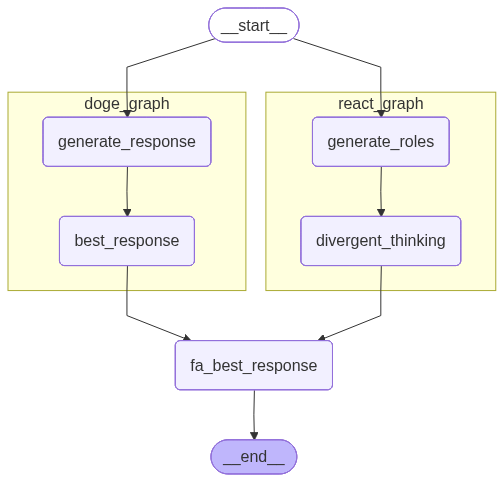
# 调用图
response = fa_graph.invoke({"roles": roles[3:6], "n": 5})这里的最佳回复,是从两个子图的所有回复中产生的最佳回复。你觉得它的质量变高了吗?( ゚∀。)
# 最佳回复
print(f"最受 {model_name} 喜爱的回复:{response['best_response']}")
最受 qwen3-max 喜爱的回复:姐姐是不是在忙呀?不着急回我,但我会一直乖乖等你的~
# 所有回复
assert len(response["roles"]) == len(response["responses"]), f'{len(response["roles"])} != {len(response["responses"])}'

for role, resp in zip(response["roles"], response["responses"]):
    print(f"【{role}】")
    print(resp)
    print()
【渣男】
刚在忙,没看到消息,不过你一不说话我就开始想你了。
【奶狗弟弟】
姐姐是不是在忙呀?不着急回我,但我会一直乖乖等你的~
【社恐宅男】
刚刚在打游戏/看番,看到消息有点紧张,不知道该怎么回你才好 😅
【高冷霸总】
看来我的时间,还不值得你回一句。
【文艺暖男】
没关系,我在这里,像月光一样安静地等你,不打扰,却始终温柔守候。
【搞笑段子手】
女神,我刚去银河系客服投诉了,说你已读不回影响宇宙和平,他们让我等你上线再派流星雨来提醒你~
【温柔学长】
没关系呀,等你有空再回我就好,不着急~
【神秘艺术家】
我的画布已为你留白,只待你落笔成诗。