ReAct Agent is an Agent that combines Reasoning with Acting. ReAct is a core pattern for building Agents and the component that best demonstrates autonomy in agent frameworks.
Its workflow follows a three-step loop:
Think
Act
Observe
This loop continues until the LLM determines that the task is completed or cannot proceed.
This means the Agent can automatically supplement unknown context information through tool calls. Then, based on the newly acquired information, it makes the next decision. For example, if you ask the Agent to query records in a database, it may not yet know what tables exist in the database or what fields are in those tables. But through several rounds of active querying and observation, even if your query is somewhat vague, it can likely infer which record you need from the table names and fields. This is the power of ReAct Agent.
This section covers:
How to create a simple ReAct Agent
How to create a ReAct Agent with tools
How to create a ReAct Agent with tool permissions
Structured output
Streaming output
1. Environment Setup
1.1 Install Dependencies
You can download this repository to your local machine, then run the following command to install the complete Python dependencies:
cd dive-into-langgraph
pip install -r requirements.txt
Dependency List
Here is the list of dependencies in requirements.txt:
pydanticpython-dotenvlangchain[openai]langchain-communitylangchain-mcp-adapterslangchain-text-splitterslanggraphlanggraph-cli[inmem]langgraph-supervisorlanggraph-checkpoint-sqlitelanggraph-checkpoint-redislangmemipynbnamefastmcpbs4scikit-learnsupervisorjiebadashscopetavily-pythonddgs
Alternatively, you can directly install LangGraph and install missing dependencies as needed:
pip install langgraph langchain1.2 Import Dependencies
Create a .env file using .env.example:
cp .env.example .envPS: This tutorial uses models from the Alibaba Bailian platform. You need to register an account on the Alibaba Bailian Platform and fill the obtained API key into the
DASHSCOPE_API_KEYvariable in the .env file.
import os

from dotenv import load_dotenv
from IPython.display import HTML, display, update_display
from langchain_openai import ChatOpenAI
from langchain.agents import create_agent
from langchain.chat_models import init_chat_model

# Load model configuration
# Please configure DASHSCOPE_API_KEY in .env file first
_ = load_dotenv()
1.3 Load LLM
Here are two methods to load the LLM, choose either one:
# Method 1: Load LLM using ChatOpenAI
llm = ChatOpenAI(
    model="qwen3-coder-plus",
    api_key=os.getenv("DASHSCOPE_API_KEY"),
    base_url=os.getenv("DASHSCOPE_BASE_URL"),
)

# Method 2: Load LLM using init_chat_model
llm = init_chat_model(
    model="qwen3-coder-plus",
    model_provider="openai",  # Qwen is compatible with OpenAI API
    api_key=os.getenv("DASHSCOPE_API_KEY"),
    base_url=os.getenv("DASHSCOPE_BASE_URL"),
)
2. Simple Agent
First, create the simplest ReAct Agent.
# Create a simple Agent
agent = create_agent(
    model=llm,
    system_prompt="You are a helpful assistant",
)

# Run Agent
response = agent.invoke({'messages': 'hello'})

response['messages'][-1].content
'Hello! How can I assist you today?'# Visualize Agent
agent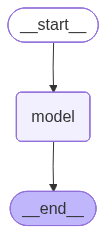
3. Agent with Tool Calling
Next, we create a ReAct Agent with tool calling, which can autonomously decide whether to call tools based on requirements.
# A tool function
def get_weather(city: str) -> str:
    """Get weather for a given city."""
    return f"It's sunny in {city}!"

# Create Agent with tool calling
tool_agent = create_agent(
    model=llm,
    tools=[get_weather],
    system_prompt="You are a helpful assistant",
)

# Run Agent
response = tool_agent.invoke(
    {"messages": [{"role": "user", "content": "what is the weather in sf"}]}
)

response['messages'][-1].content
'The weather in San Francisco (SF) is currently sunny!'# Visualize Agent
tool_agent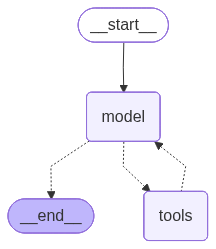
4. Using ToolRuntime to Control Tool Permissions
Below we create a tool with runtime, where the runtime type is ToolRuntime. When we call the Agent, we pass this runtime to the tool. The tool then determines whether the current call has execution permission based on the information in the runtime.
from typing import Literal, Any
from pydantic import BaseModel
from langchain.tools import tool, ToolRuntime

class Context(BaseModel):
    authority: Literal["admin", "user"]

# Create tool with permission control, depends on ToolRuntime content for judgment
@tool
def math_add(runtime: ToolRuntime[Context, Any], a: int, b: int) -> int:
    """Add two numbers together."""
    authority = runtime.context.authority
    # Only admin users can access the addition tool
    if authority != "admin":
        raise PermissionError("User does not have permission to add numbers")
    return a + b

# Create Agent with tool calling
tool_agent = create_agent(
    model=llm,
    tools=[get_weather, math_add],
    system_prompt="You are a helpful assistant",
)

# Inject context when running Agent
response = tool_agent.invoke(
    {"messages": [{"role": "user", "content": "Please calculate 8234783 + 94123832 = ?"}]},
    config={"configurable": {"thread_id": "1"}},
    context=Context(authority="admin"),
)
for message in response['messages']:
message.pretty_print()================================ Human Message =================================
Please calculate 8234783 + 94123832 = ?
================================== Ai Message ==================================
Tool Calls:
math_add (call_726f6b3a42134c0bb36f1bb7)
Call ID: call_726f6b3a42134c0bb36f1bb7
Args:
a: 8234783
b: 94123832
================================= Tool Message =================================
Name: math_add
102358615
================================== Ai Message ==================================
The sum of 8234783 and 94123832 is 102358615.
# Verify the calculation result is correct
8234783 + 941238321023586155. Structured Output
To get structured output, you can set the response_format parameter in the create_agent function. In the following example, we define the output format using BaseModel and specify this format in response_format.
from pydantic import BaseModel, Field

class CalcInfo(BaseModel):
    """Calculation information."""
    output: int = Field(description="The calculation result")
# Create Agent with structured output
structured_agent = create_agent(
model=llm,
tools=[get_weather, math_add],
system_prompt="You are a helpful assistant",
response_format=CalcInfo,
)
response = structured_agent.invoke(
{"messages": [{"role": "user", "content": "Please calculate 8234783 + 94123832 = ?"}]},
config={"configurable": {"thread_id": "1"}},
context=Context(authority="admin"),
)for message in response['messages']:
message.pretty_print()================================ Human Message =================================
Please calculate 8234783 + 94123832 = ?
================================== Ai Message ==================================
Tool Calls:
math_add (call_56cf16ee56aa4a6193cabf42)
Call ID: call_56cf16ee56aa4a6193cabf42
Args:
a: 8234783
b: 94123832
================================= Tool Message =================================
Name: math_add
102358615
================================== Ai Message ==================================
Tool Calls:
CalcInfo (call_3281c9eabf8a4f31aca53ea0)
Call ID: call_3281c9eabf8a4f31aca53ea0
Args:
output: 102358615
================================= Tool Message =================================
Name: CalcInfo
Returning structured response: output=102358615
response['structured_response']CalcInfo(output=102358615)6. Streaming Output
Below is a brief introduction. For more information, please refer to streaming.
6.1 updates Mode
stream_mode="updates": Stream updates after each node completes
%autoawait on

agent = create_agent(
    model=llm,
    tools=[get_weather],
)

for chunk in agent.stream(
    {"messages": [{"role": "user", "content": "What is the weather in SF?"}]},
    stream_mode="updates",
):
    for step, data in chunk.items():
        print(f"step: {step}")
        print(f"content: {data['messages'][-1].content_blocks}")
step: model
content: [{'type': 'tool_call', 'name': 'get_weather', 'args': {'city': 'SF'}, 'id': 'call_f6ff6132964a46fe8b133077'}]
step: tools
content: [{'type': 'text', 'text': "It's sunny in SF!"}]
step: model
content: [{'type': 'text', 'text': 'The weather in San Francisco is sunny! 🌞'}]
6.2 messages Mode
stream_mode="messages": Stream updates after each token is generated
async def agent_invoke():
    content, last_node = "", ""
    display_handle = display("", display_id=True)

    async for token, metadata in agent.astream(
        {"messages": [{"role": "user", "content": "What is the weather in SF?"}]},
        stream_mode="messages",
    ):
        node = metadata['langgraph_node']
        if last_node and node != last_node:
            content += f"\n\n🔹 <b>node:</b> {node}\n📝 <b>content: </b>"
        if node == 'model' and token.content:
            content += token.content
        elif node == 'tools' and token.content:
            content += token.content

        last_node = node
        update_display(HTML(f"<pre>{content}</pre>"), display_id=display_handle.display_id)

print("Print output results of tool node and model node:")
await agent_invoke()
Print output results of tool node and model node:
6.3 values Mode
stream_mode="values": Stream snapshots of the State, allowing you to view tool call information
async def agent_invoke():
    content, last_node = "", ""

    async for payload in agent.astream(
        {"messages": [{"role": "user", "content": "What is the weather in SF?"}]},
        stream_mode="messages",
    ):
        state = payload[0]
        if hasattr(state, "tool_calls") and state.tool_calls:
            if state.tool_calls[0].get('name'):
                print("name:", state.tool_calls[0].get('name'))
            if state.tool_calls[0].get('args'):
                print("args:", state.tool_calls[0].get('args'))

print("Print tool call information:\n")
await agent_invoke()
Print tool call information:
name: get_weather
args: {'city': 'SF'}